MDVR UPS & Battery Backup: The 2026 Fleet Buyer's Complete Guide
Why 62% of accident footage is lost to power failure. How to choose the right MDVR UPS module, calculate required runtime, install correctly and avoid the 5 most costly mistakes.
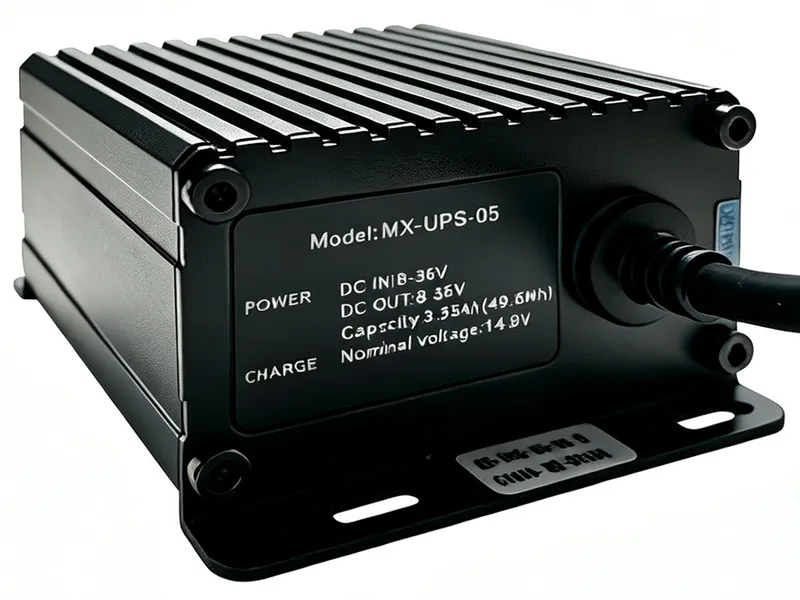
If you're running a fleet video surveillance system without dedicated MDVR UPS (Uninterruptible Power Supply) backup, you're gambling with your most critical evidence. Industry data from fleet operators who've experienced major incidents shows a sobering statistic: 62% of the time, the decisive video footage around an accident is lost — not because the camera failed, but because the MDVR lost power before it could finish writing the file.
Why Power Failure Is the #1 Evidence Killer
In a serious accident, several things happen almost simultaneously: the vehicle battery may be destroyed in the impact, the main power harness can be severed, or the ignition circuit is cut. If your MDVR is drawing power only from the vehicle's ACC (ignition) circuit, it shuts down instantly — often in the middle of writing the very footage you need most. Even if the MDVR survives, a sudden power cut can corrupt the FAT table on the storage medium, rendering hours of previously recorded footage unreadable.
The Three MDVR Power Backup Architectures
Not all power backup solutions are equivalent. Understanding the trade-offs is the first step to getting this right.
### 1. Built-in Supercapacitor (Entry-Level Protection)
Most modern MDVRs include a small supercapacitor bank that delivers 30 seconds to 5 minutes of runtime. This is designed for one purpose and one purpose only: to flush the in-memory video buffer to the storage medium and close the file cleanly. It is not designed to continue recording. If your deployment is on a tight budget, make sure at minimum every MDVR you buy has this feature. It's the absolute baseline.
### 2. External MDVR UPS Module (Most Cost-Effective)
This is the sweet spot for most commercial fleets. A dedicated MDVR UPS unit connects between the vehicle battery and the MDVR, providing 30 minutes to several hours of backup recording time depending on capacity. The best units (like the MX-UPS series) feature seamless 10ms switching, 9V-36V wide input for both 12V and 24V vehicles, and intelligent charging management that protects the vehicle's starting battery from being drained. Look for IP65+ rated housings if operating in harsh environments.
### 3. Integrated Lithium Battery Pack (Extended Runtime)
For applications requiring extended parking-mode recording (law enforcement, high-value cargo, car-share fleets), an integrated lithium battery pack in the 5000mAh–20000mAh range delivers 2–8 hours of continuous recording. Always specify automotive-grade packs with UN38.3 certification — consumer-grade lithium batteries have no place in a vehicle environment.
How to Calculate Your MDVR UPS Runtime Requirement
Getting the capacity right matters. Under-specify and you're still unprotected; over-specify and you're wasting money and payload.
**Formula:** Required Watt-Hours (Wh) = MDVR Power Draw (W) × Desired Backup Time (h) × 1.2 (safety margin)
**Real-world examples:**
- A 4-channel 1080P MDVR typically draws 12–18W. For 2 hours of backup: 18W × 2h × 1.2 = 43.2Wh. A 44Wh unit like the MX-UPS is the perfect match.
- An 8-channel AI MDVR with 4G and GPS draws 25–35W. For 1 hour of backup: 35W × 1h × 1.2 = 42Wh. The same 44Wh unit still works. For 3 hours, step up to 126Wh.
- A 2-channel dash cam draws only 5–8W. A 44Wh UPS gives you 5+ hours of runtime.
The 5 Most Costly MDVR UPS Installation Mistakes
**Mistake 1: Wiring to ACC instead of constant battery power.** If the UPS only charges when the ignition is on, it will be depleted after a few days of parked vehicles and unable to protect against startup transients. Always wire the UPS input to a constant battery (B+) circuit with an appropriately sized fuse.
**Mistake 2: Skipping low-voltage protection.** A quality MDVR UPS should have a configurable low-voltage cutoff (typically 11.8V for 12V systems, 23.5V for 24V). If the UPS drains the starting battery below this threshold, your vehicle won't start — and that's worse than losing video.
**Mistake 3: Failing to test the seamless switch.** After installation, simulate a power cut by pulling the main power fuse while recording. If you see even a single frame drop or the MDVR reboots, the switching circuit is too slow and you need a better unit. Target under 20ms switch time.
**Mistake 4: Mounting the UPS in an exposed location.** MDVR UPS units contain lithium cells. Mount them away from direct sunlight, away from exhaust heat sources, and never in the passenger footwell where they can become projectiles in a crash.
**Mistake 5: Ignoring temperature ratings.** A UPS rated for 0-45°C charging will fail in a Dubai summer where cabin temperatures can exceed 70°C. Look for at least -20°C to +60°C operating range for any serious fleet deployment.
The Bottom Line
MDVR UPS is not an optional accessory — it's the insurance policy on the evidence you're investing in. A $70 UPS module protects the evidentiary value of a $500 MDVR installation and potentially tens of thousands in liability exposure. For the cost of one tire, you can ensure that when the worst happens on the road, you have the footage to prove what really occurred.